

BK8 APK Download and Install Guide
BK8 runs a native app for Android and iOS, plus a mobile web version for anyone who would rather not install anything. Setup takes a couple of minutes and your account does not change: the same username, the same balance and the same promotions carry over from the browser. The download page holds separate QR codes for each system. Everything the platform offers is summarised on BK8 Malaysia.

288% up to MYR 2,880 welcome bonus for new members
| Systems: | Android APK, iOS |
| Currency: | MYR |
| Login: | Express Login, Face ID, fingerprint |
| Sections: | Sports, E-Sports, Casino, Slots, Fishing, Fast Games, 4D |
What the BK8 App Gives You
The BK8 Malaysia app is not a shortcut to the website in a frame. It carries features the browser version does not have, and they are the reason regular players end up installing it.
- Seamless Wallet Transfer. Money moves between provider wallets on one screen instead of a separate Transfer page, which matters when you switch from a football slip to a slot.
- Express Login. Returning to your account without typing the username and password again.
- Face ID and fingerprint. Biometric unlock instead of a password on the device you own.
- Referral programme. The invite link and its tracking sit inside the app.
Every section of the platform opens in it: sports, e-sports, live casino, slots, fishing, fast games and the 4D and lottery tab. Deposits, withdrawals and promotions work the same way as on the site, in ringgit.
How to Download the BK8 App on Android
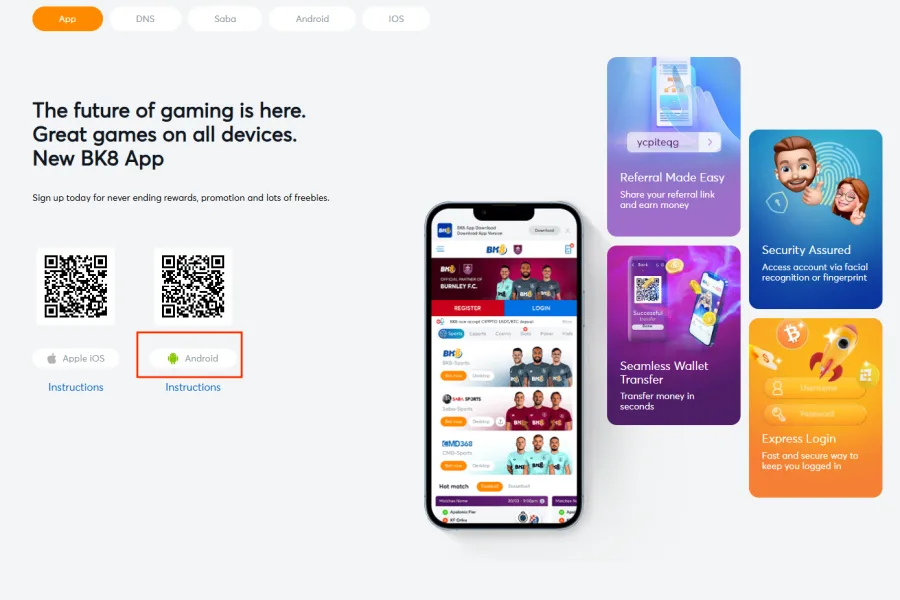
Android installs from an APK file rather than from a store listing, so the file comes straight from the site. Two steps:
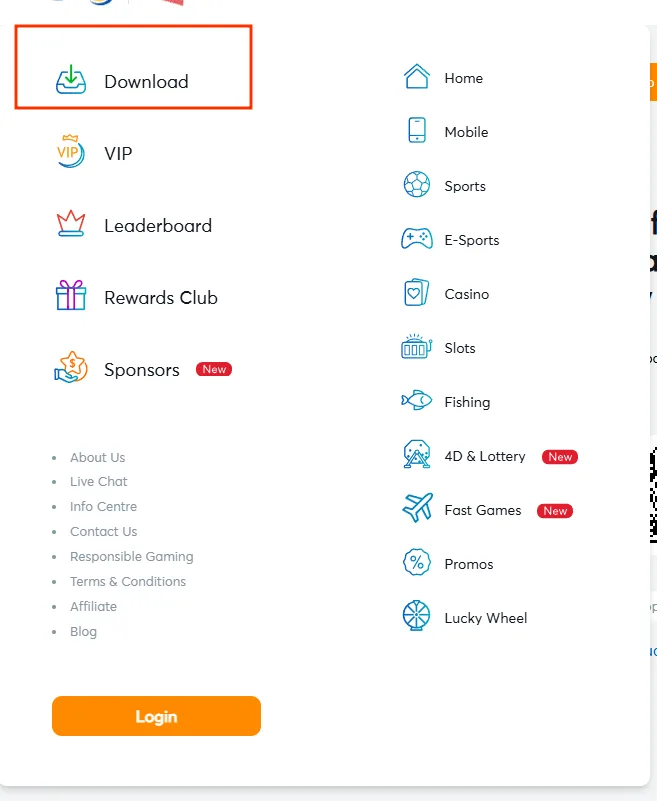
Tap the Android download button
Open the download page on the BK8 site and press the Android button. The QR code next to it does the same job if you are switching from a desktop screen to your phone.
Install the APK
The file downloads to your device. Open it and confirm with INSTALL when the system asks. When it finishes, the BK8 icon appears on the home screen and you can sign in.
If the system blocks the file, Android is asking for permission to install from a source outside the store. That switch lives in the security or app settings of your phone, usually under install unknown apps for the browser you downloaded with. Turn it on for that browser only, install, and leave the rest of the device as it was.
How to Install BK8 on iPhone
The BK8 download for iOS takes a route that surprises most people the first time, because the App Store listing does not carry the brand name. Four steps:
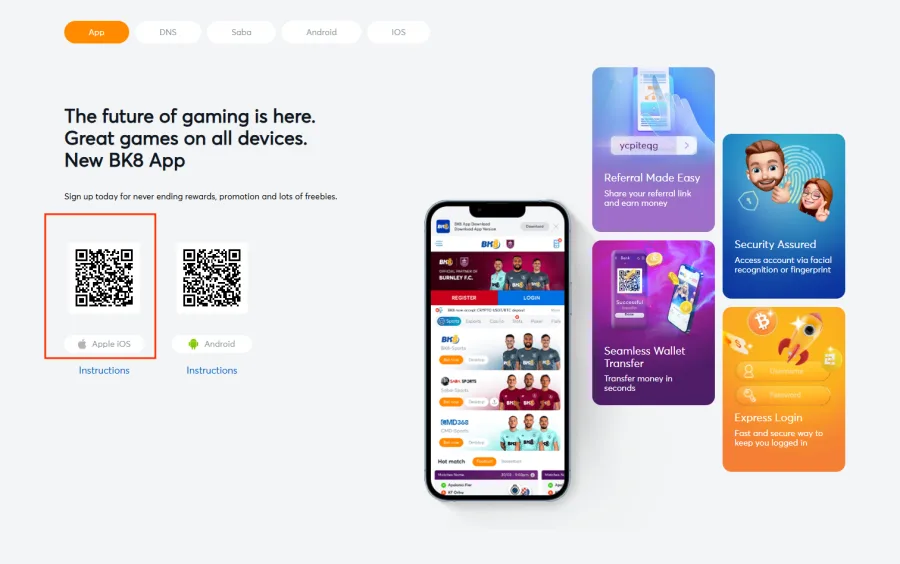
Press the Apple iOS button on the site
Open the download page and tap the Apple iOS button. Start here rather than in the App Store, because the route matters.
Tap OPEN on the preview page
A new tab opens with an app preview page. Press OPEN on it and the redirect continues to the App Store.
Install Cookbyte with GET
The App Store opens an app called Cookbyte, not BK8. This is the correct listing. Press GET and let it install as normal.
Open Cookbyte and allow paste
Launch Cookbyte to start the BK8 app. When the prompt says Cookbyte would like to paste from Safari, tap Allow Paste. Without it the app cannot pick up the link you came from.
One detail decides whether this works: searching for Cookbyte directly in the App Store will not give you access to BK8. The listing has to be reached through the button on the site, because the redirect carries the data the app needs on first launch. If you installed Cookbyte from a search and it opens as something else, delete it and start again from the download page.
Mobile Website or App: What to Choose
Both routes reach the same account, so this is a question of habit rather than of access.
The BK8 mobile site opens in any browser, needs no installation and takes no storage on the phone. Nothing is left behind when you close the tab, which suits an occasional bet or a first look at the platform.
The app is the better fit for regular play: Express Login and biometric unlock cut the sign-in to a tap, wallet transfers happen on one screen, and notifications reach you when a promotion opens. In exchange it takes space on the device and needs the install steps above.
A simple rule: if you sign in more than once a week, install it. If not, the browser is enough.
Logging In and Registering in the App
There is one account behind both the site and the app, so nothing needs to be created twice. If you already play in a browser, open the app and sign in with the same Username and Password, then switch on Express Login so the next visit skips the form.
If you are starting fresh, the registration form opens inside the app. It asks for Username, Password, Contact number with the +60 code, Email, Full Name and Preferred Currency, which you set to Malaysian Ringgit. An Affiliate or Referral ID field is there if you have a code. The full walkthrough is on the BK8 Malaysia register page, and sign-in problems are covered on the BK8 login page.
Deposits and Withdrawals in the App
The cashier inside the BK8 casino app download is the same one the website uses. Deposits run through Touch N Go, GrabPay, Boost Pay and ShopeePay, DuitNow QR, a local MYR bank transfer, Visa and Mastercard, or crypto in USDT, BTC and ETH.
Withdrawals go out by bank transfer to an account in your own name, or in crypto. Before a game accepts a stake, the money still has to reach the wallet of that provider, and Seamless Wallet Transfer is what makes this quick in the app.
Method by method limits and the documents that may be requested are on the BK8 deposit page.
Safe Download and App Security
Search results for a BK8 mod apk lead to files nobody at the brand built. A modified build can carry code that reads what you type, and installing one usually ends with a lost account rather than with an advantage. There is no version of the app with better odds, unlocked bonuses or free credit, because those live on the server, not in the file.
Take the APK from the official download page only, and ignore links sent in chats, forums or comments, however convincing the sender sounds.
On the device itself: turn on Face ID or fingerprint unlock, keep the password out of shared notes, and sign out of the account if you ever open it on someone else’s phone. Closing the app is not the same as signing out.
App Not Installing: Quick Fixes
Most failed installs come down to four things, and each has a one-step answer:
- Not enough storage. Clear space and run the file again.
- Install blocked by the system. Allow installation from unknown sources for the browser you downloaded with, in the Android security settings.
- Corrupted download. Delete the file and download it again from the official page rather than reopening the broken one.
- Old system version. Update the phone, then retry the install.
On iPhone, an install that ends in the wrong app almost always means Cookbyte was found through a store search instead of through the button on the site.
If none of this clears it, LiveChat is open around the clock. Contact routes are listed on the BK8 customer service page.
BK8 App FAQ
Is the BK8 app free to download?
Yes. The Android APK and the iOS route both cost nothing. You only fund the account itself, from MYR 50 if you want the welcome bonus.
Why is the iOS app listed as Cookbyte in the App Store?
That is the listing the download button redirects to. Opening Cookbyte launches BK8. Searching for Cookbyte directly in the store will not give you access.
Can I use the same account in the app and on the website?
Yes. One account, one balance and one set of promotions. Sign in with the same username and password, then enable Express Login.
Can I deposit and withdraw inside the app?
Yes. The cashier is identical to the site: local e-wallets, DuitNow, bank transfer, cards and crypto, all settled in ringgit.
Is the BK8 app available on Google Play?
Android installs from an APK downloaded on the site, not from a store listing. Allow installation from unknown sources for your browser to complete it.
What should I do if the APK does not install?
Check free storage, allow unknown sources, download the file again, and update the system. If it still fails, ask LiveChat.
Updated: